SmartPeak Features
Select features from dilutions preference
Usage
Once workflow has been run, we sometimes know that we will have more interresting features to analyse compared to others depending on the dilution factor of the corresponding sample that produced this feature for a specific component.
SmartPeak allows to specify this selection as a step of the MERGE_INJECTIONS workflow step using the select_preferred_dilution parameter (false by default).
When select_preferred_dilution is set to true, SmartPeak will look for a file specified by a second parameter select_preferred_dilutions_file. This csv file will conatins the list of components and the corresponding preferred dilution:
component_name |
dilution_factor |
|---|---|
trp-L.trp-L_1.Heavy |
10 |
trp-L.trp-L_1.Light |
10 |
arg-L.arg-L_1.Heavy |
1 |
arg-L.arg-L_1.Light |
1 |
During the MERGE_INJECTIONS all components from the features that are listed the file and to which the injection dilution does not correspond to the value set in the select_preferred_dilutions_file will be removed. The MERGE_INJECTIONS will be then applied as usual.
Example
Our sequence file is as follow (only relevant columns appear):
sample_name |
sample_group_name |
scan_polarity |
scan_mass_low |
scan_mass_high |
dilution_factor |
|---|---|---|---|---|---|
Lyubomir_Split_2_210914_4 |
Group1 |
positive |
-1 |
-1 |
10 |
Lyubomir_Split_2_210914_25 |
Group1 |
negative |
-1 |
-1 |
10 |
Lyubomir_Split_2_210914_5 |
Group1 |
positive |
-1 |
-1 |
1 |
Lyubomir_Split_2_210914_26 |
Group1 |
negative |
-1 |
-1 |
10 |
Lyubomir_Split_2_210914_6 |
Group1 |
positive |
-1 |
-1 |
1 |
Lyubomir_Split_2_210914_6 |
Group1 |
negative |
-1 |
-1 |
10 |
Please note that all our injections we want to select from are in the same group.
The parameters are set as follow in SmartPeak:

note that the mass_range_merge_rule, dilution_series_merge_rule and scan_polarity_merge_rule as been set to Max in our example, but you can set to another value. These rules will be applied after having explcuding the features that do not correspond to our preference.
The dilution file is as follow:
component_name |
dilution_factor |
|---|---|
trp-L.trp-L_1.Heavy |
10 |
trp-L.trp-L_1.Light |
10 |
arg-L.arg-L_1.Heavy |
1 |
arg-L.arg-L_1.Light |
1 |
The workflow will be:
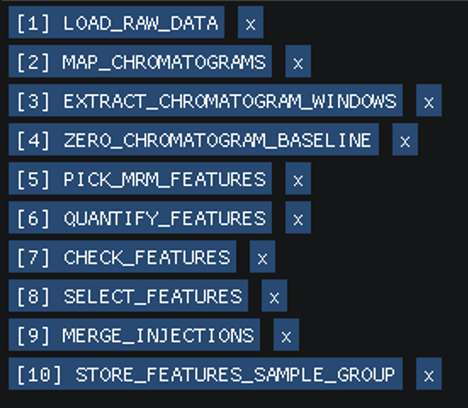
Once the workflow has been run, We will export the Group Pivot Table:
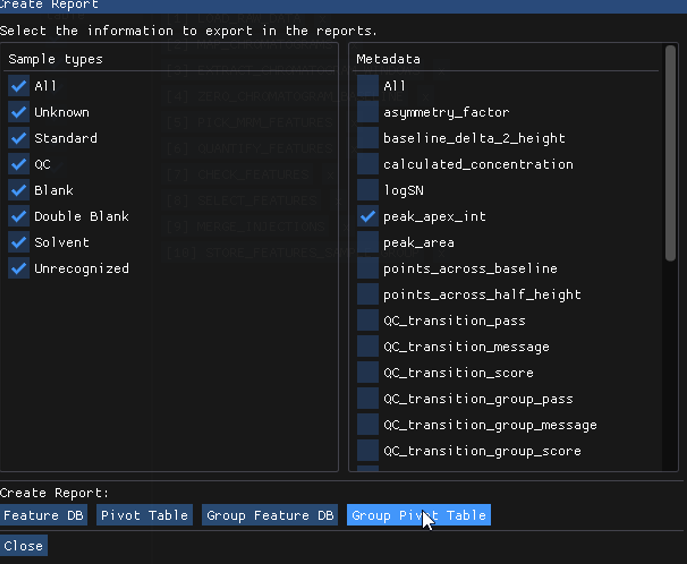
The result is then:

The value for peak_apex_int is 207.
Indeed the feature database willl show us that it is the maximum peak_apex_int from the sample based on dilution 10.

Now, in our dilution file, if we set trp-L.trp-L_1.Heavy to preferred dilution_factor 1, the result will be 137, which is the maximum peak_apex_int from the sample based on dilution 1.